Types of Google Ads
Published: 14 Nov 2025
Do you ever get confused when people discuss the various types of Google Ads? With so many options like search ads, display ads, and video ads, it can feel difficult to understand which one is right for your business. This guide explains each type in simple terms, allowing beginners to easily learn how Google Ads works. If you want to explore more helpful topics, you can also read our guide on advertising platforms.
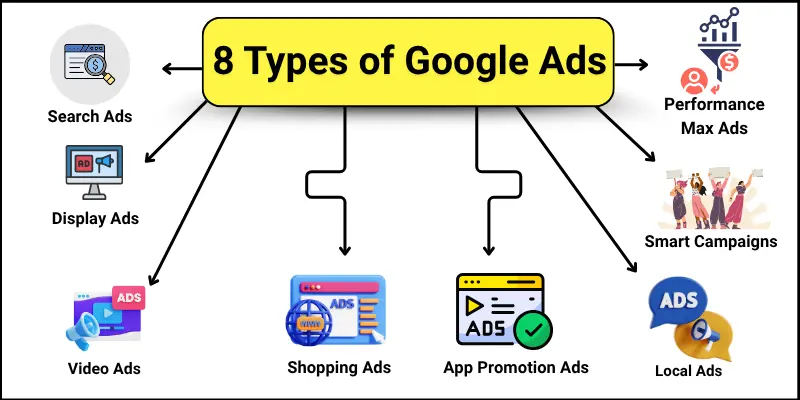
8 Types of Google Ads
Google offers different types of Google Ads to help businesses reach the right people at the right time. Each ad type works in a unique way and supports different marketing goals.
Here are the types of Google Ads
- Search Ads
- Display Ads
- Video Ads
- Shopping Ads
- App Promotion Ads
- Local Ads
- Smart Campaigns
- Performance Max Ads
Search Ads
Search Ads appear when people search on Google. They show text about a product, service, or business. These ads are simple and easy to read.
Where they appear
Search Ads appear at the top or bottom of Google search results. Sometimes, they also appear on the right side of the search page.
Best for
Businesses that want people ready to buy or search for information.
Simple example
If someone searches for “buy shoes online,” a shoe store ad can appear at the top. The ad shows the store name, product, and website link.
| Benefits |
|---|
|
| Limitations |
|---|
|
Display Ads
Display Ads are pictures or videos. They can also have text. These ads are more visual than Search Ads. They help attract people who are browsing online.
Where they appear
Display Ads appear on websites, apps, and YouTube. They not only appear on Google search results.
Best for
Display Ads are best for businesses that want to show their brand or products. They are effective for reaching a large audience online.
Simple example
A clothing store can show a colourful ad on a fashion website. People can see the ad while reading articles or watching videos.
| Benefits |
|---|
|
| Limitations |
|---|
|
Video Ads
Video Ads are short videos shown online. They can appear before, during, or after other videos. These ads help businesses show their message in a visual way.
Where they appear
Video Ads appear on YouTube and other websites that show videos. They also appear in apps that support video ads.
Best for
Video Ads are best for businesses that want to tell a story. They help people remember the brand or product easily.
Simple example
A toy store can show a 15-second video of kids playing with their toys on YouTube. People watch the video before their favourite cartoon.
| Benefits |
|---|
|
| Limitations |
|---|
|
Shopping Ads
Shopping Ads show a product image, price, and store name. They appear when people search for products online. These ads help people see what they can buy at a glance.
Where they appear
Shopping Ads appear on Google search results and Google Shopping. They show pictures and prices above or beside other search results.
Best for
Shopping Ads are best for online stores that sell products. They help people find products quickly.
Simple example
If someone searches for “red shoes for kids,” a store can display a Shopping Ad featuring the shoe picture, price, and link to purchase.
| Benefits |
|---|
|
| Limitations |
|---|
|
App Promotion Ads
App Promotion Ads help people download apps. They can appear on Google Search, YouTube, or apps. These ads showcase your app to people who may be interested in it.
Where they appear
App Promotion Ads appear on Google Play, websites, and mobile apps. They can also show inside other apps.
Best for
These ads are best for businesses with mobile apps. They help increase app downloads quickly.
Simple example
If someone searches “fitness app,” a gym app can show an ad. People can click and install the app instantly.
| Benefits |
|---|
|
| Limitations |
|---|
|
Local Ads
Local Ads help people find nearby businesses. They display your business location, contact information, and working hours. These ads are great for attracting local customers.
Where they appear
Local Ads appear on Google Maps, Google Search, and YouTube. They can also appear on Google partner websites.
Best for
Local Ads are best for shops, restaurants, salons, and local services. They help people easily visit your business.
Simple example
If someone searches “pizza near me,” a local pizza shop can show an ad with address, phone number, and reviews.
| Benefits |
|---|
|
| Limitations |
|---|
|
Smart Campaigns
Smart Campaigns are automated ads by Google. Google automatically shows your ads to the right people. You don’t need to manage every detail.
Where they appear
Smart Campaigns appear on Google Search, Display Network, Google Maps, and YouTube. They reach people across multiple platforms.
Best for
Smart Campaigns are best for beginners. They help small businesses advertise without much effort.
Simple example
If someone searches “best coffee near me,” a local coffee shop can show an automated ad. Google decides where and when to show it.
| Benefits |
|---|
|
| Limitations |
|---|
|
Performance Max Ads
Performance Max Ads are automated ads by Google. They appear on all Google platforms. Google uses AI to show your ads to the right audience.
Where they appear
Performance Max Ads appear on Google Search, Display, YouTube, Gmail, and Maps. They reach people across all Google channels.
Best for
Performance Max Ads are best for businesses with multiple goals. They help increase leads, sales, and brand awareness at the same time.
Simple example
If a store wants to sell shoes online, Google can show the ad on YouTube, Search, and partner websites. Google chooses the best place automatically.
| Benefit |
|---|
|
| Limitations |
|---|
|
Conclusion
So, friends, it’s time to wrap up! We have covered 8 types of Google Ads in detail. In my opinion, beginners should start with Search Ads or Smart Campaigns. They are simple and give good results quickly. Try these ads for your business today and see the difference!
FAQs about types of Google Ads
Check out these common questions about Google Ads.
Search Ads, Shopping Ads, App Promotion Ads, and Local Ads give fast results. They reach people who are already interested. These ads get clicks and actions quickly.
The cost depends on your keywords, target audience, and level of competition. You can set a daily budget to control spending. Even small businesses can start with low budgets.
Yes, Google Ads can bring more people to your website. Search and Display Ads are best for traffic. More visitors can lead to more sales or leads.
Not all ads need images or videos. Search Ads use only text. Display, Video, Shopping, and App Ads use images or videos to attract attention.
Yes, Local Ads help you reach people near your business. They show your address, phone number, and working hours. This brings more visitors to your shop or office.

- Be Respectful
- Stay Relevant
- Stay Positive
- True Feedback
- Encourage Discussion
- Avoid Spamming
- No Fake News
- Don't Copy-Paste
- No Personal Attacks
- Be Respectful
- Stay Relevant
- Stay Positive
- True Feedback
- Encourage Discussion
- Avoid Spamming
- No Fake News
- Don't Copy-Paste
- No Personal Attacks
