How to update old content for seo
Published: 15 Feb 2026
Struggling to get traffic from your old blog posts? Search rankings do not stay the same forever. Many posts slowly lose visitors because the information becomes old, incomplete, or less useful. If you do not update your content, competitors can easily take your position on Google.
The good news is, you do not always need to write new articles. You can update your old content and improve its SEO to get better rankings and more traffic.
In this guide, you will learn how to update old content for SEO step by step. Everything is explained in simple words, so even beginners can follow easily. By the end, you will know how to refresh your content, improve its quality, and rank higher in search results.
What Does Updating Old Content for SEO Mean?
Updating old content for SEO means making changes to your existing articles so they become fresh, useful, and better for search engines. It is not the same as rewriting the whole article from scratch. Instead, you improve what is already there.
For example, you can add new information, update old statistics, include new keywords, fix broken links, or improve readability. The goal is to make your content more valuable for readers and more attractive to Google. Updated content can rank higher, get more traffic, and help your website stay relevant.
Why Updating Old Content Is Important for SEO
Updating old content is very important. It helps your website stay strong on Google. When you update articles, they become fresh and useful. Google loves accurate and up-to-date content.
Here are the main reasons to update old content:
- Improves rankings: Fresh content can rank higher.
- Increases traffic: More people visit your page.
- Better user experience: Readers get correct information.
- Builds trust: Google and readers trust updated websites.
- Higher click-through rate (CTR): Updated content gets more clicks.
Updating old content is easier than writing new articles. It keeps your website competitive and relevant.
How to update old content for seo in step-by-step
Updating old content is easier than you think. You do not have to write a new article. Even small changes can make a big difference. They can improve your rankings, bring more traffic, and make your content better for readers.
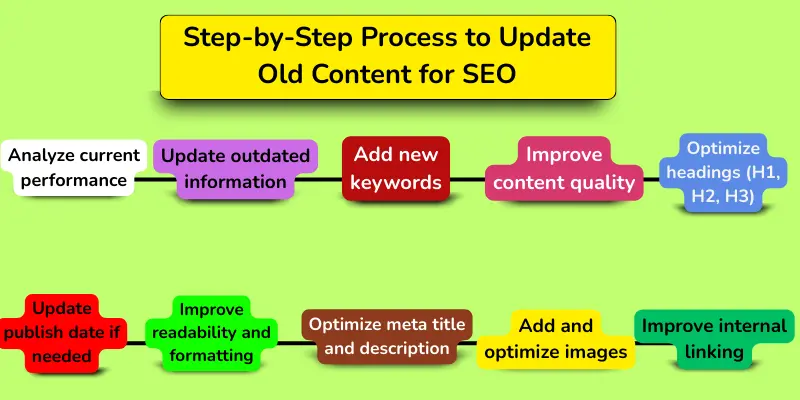
Here is a simple step-by-step process you can follow to refresh your content for SEO:
- Analyze current performance
- Update outdated information
- Add new keywords
- Improve content quality
- Optimize headings (H1, H2, H3)
- Improve internal linking
- Optimize meta title and description
- Add and optimize images
- Improve readability and formatting
- Update publish date if needed
Step 1. Analyze Current Performance
Before you update a page, check how it is doing. Look at traffic. Look at rankings. Look at user engagement. This helps you know which pages need updates the most.
Here’s how to analyze your content:
- Check traffic: Open Google Analytics. See how many people visit your page.
- Check rankings: See which keywords your page ranks for on Google.
- Check impressions and clicks: Use Google Search Console to see clicks and views.
- Find low-performing pages: Focus on pages that lost traffic or dropped in rankings.
Analyzing first saves time. It helps you plan better. It also makes sure your updates give real results. Your content will become stronger for readers and Google.
Step 2. Update Outdated Information
Old content often has old facts, numbers, or examples. Updating them makes your content fresh and useful. It also shows Google that your page is trustworthy.
Here’s what you should do:
- Replace old facts: Make all information correct and up-to-date.
- Update statistics: Use the latest numbers and data.
- Add new examples: Include recent examples readers can relate to.
- Fix broken links: Remove or replace links that do not work.
Fresh content improves user experience. It builds trust with readers. Updated content can also rank higher and get more traffic.
Step 3. Add New Keywords
Adding new keywords helps your content reach more people. It makes your page more relevant for Google searches. Even small keyword updates can bring big results.
Here’s how to add new keywords:
- Find new keywords: Use tools like Google Keyword Planner or Ahrefs.
- Add primary keywords: Make sure main keywords appear naturally in the text.
- Add secondary keywords: Include related words to cover more search queries.
- Avoid keyword stuffing: Do not force keywords unnaturally.
Adding the right keywords improves rankings. It also helps readers find your content easily.
Step 5: Optimize Headings (H1, H2, H3)
Headings help readers understand your content easily. They also help Google understand your page structure. Good headings improve both SEO and user experience.
Here’s how to optimize your headings:
- Add keywords in headings: Use your main keyword naturally.
- Use proper heading structure: Use H1 for title, H2 for sections, and H3 for sub-sections.
- Make headings clear: Tell readers what each section is about.
- Keep headings simple: use short, easy words.
Optimized headings improve readability. They also help your content rank better on Google.
Step 6. Improve Internal Linking
Internal links connect your pages to each other. They help readers find more useful content on your website. They also help Google understand your site structure. Strong internal linking improves SEO and keeps visitors on your site longer.
Here’s how to improve internal linking:
- Add relevant links: Link to related articles on your website.
- Use clear anchor text: Use words that describe the linked page.
- Link important pages: Add links to your most valuable content.
- Fix broken links: Remove or update links that do not work.
Internal linking improves navigation. It also helps Google crawl your site better. This can improve your rankings and increase traffic.
Step 7. Optimize Meta Title and Description
Meta title and description help users understand your page. They appear in Google search results. A good meta title and description can increase clicks. They also help improve your SEO.
Here’s how to optimize meta title and description:
- Add your main keyword: Use your primary keyword naturally.
- Keep it clear and simple: Make it easy for users to understand.
- Make it attractive: Encourage users to click your page.
- Use the proper length: keep the title and description within the recommended limits.
Optimized meta tags improve click-through rate. They also help your page rank better. More clicks can bring more traffic to your website.
Step 8. Add and Optimize Images
Images make your content more attractive. They help readers better understand your content. They also improve user experience. Optimized images can help your page rank in search results.
Here’s how to add and optimize images:
- Add relevant images: Use images that match your content.
- Use descriptive file names: Name your images clearly with keywords.
- Add alt text: Describe the image using simple words.
- Compress images: Reduce file size to improve page speed.
Optimized images improve user engagement. They also help improve SEO. Faster and better pages can rank higher on Google.
Step 9. Improve Readability and Formatting
Easy content keeps readers on your page longer. It helps them understand your message quickly. Good formatting makes your content look clean and professional. It also improves user experience.
Here’s how to improve readability and formatting:
- Use short sentences: Make your content easy to read.
- Use simple words: avoid difficult or confusing ones.
- Break content into paragraphs: Do not write long blocks of text.
- Use headings and bullet points: Make content easy to scan.
Good readability keeps readers engaged. It also helps reduce bounce rate. Easy content can perform better in search results.
Step 10. Update Publish Date if Needed
Updating the publish date shows that your content is up to date. It tells readers and Google that your page is updated. Fresh content gets more trust and attention. It can also improve your rankings.
Here’s how to update the publish date:
- Update after making changes: Change the date only after real updates.
- Make meaningful improvements: Add new information before updating the date.
- Show the latest date: Display the new publish or updated date clearly.
- Avoid fake updates: Do not change the date without improving the content.
Updating the publish date helps your content look fresh. It builds trust with readers and Google. Fresh content can attract more traffic and rank better.
How to Refresh Content Without Losing Rankings
Refreshing content is good for SEO. But you must do it carefully. Small mistakes can hurt your rankings. So update your content in a smart way.
Here’s how to refresh content safely:
- Keep the same URL: Do not change your page link.
- Keep important keywords: Do not remove keywords that already rank.
- Improve; do not delete. Add more information instead of removing useful parts.
- Maintain internal links: Keep links that support your SEO.
Smart updates protect your rankings. They also help you improve traffic safely. Careful changes give better long-term results.
Best Tools to Update Old Content for SEO
The right tools make updating content easier. They help you find keywords, check performance, and fix SEO issues. Using tools saves time and improves results.
Here’s a list of the best tools:
- Google Search Console: See traffic, clicks, and impressions.
- Google Analytics: Check page visits and user behavior.
- Ahrefs: Find keywords and analyze competitors.
- SEMrush: Track rankings and SEO opportunities.
- Ubersuggest by Neil Patel: Discover keywords and content ideas.
- Screaming Frog: Check broken links and SEO issues.
Using these tools helps you update content smartly. They also improve your SEO performance. Good tools save time and boost rankings.
Signs Your Content Needs Updating
Sometimes you may not know which pages need updates. Certain signs tell you it’s time to refresh your content. Watching for these signs helps you improve SEO and traffic.
Here are the main signs:
- Drop in traffic: Page visits are decreasing over time.
- Drop in rankings: Keywords are losing positions on Google.
- Outdated information: Facts, numbers, or examples are old.
- Broken links: Some links on the page no longer work.
- Low engagement: Readers spend little time on the page.
If you notice these signs, it’s time to update. Updating improves rankings, traffic, and user experience. Fresh content keeps your website strong.
Conclusion
So guys, it’s time to finish up! In this article, we’ve covered how to update old content for SEO in detail. I recommend checking your old posts regularly and updating them step by step. Even small updates can bring better rankings and more traffic. Start with your most important pages today and see the results. Don’t wait, refresh your content now and watch your website grow!
FAQs about how to update old content for SEO
Updating old content keeps it fresh and useful. Google prefers updated pages. Fresh content can rank higher and bring more traffic.
Check pages that lost traffic or rankings. Look for outdated information or broken links. Low engagement also shows that the content needs to be refreshed.
It depends on your content type. For fast-changing topics, update every few months. For evergreen content, once a year is enough.
Yes! Even small changes like fixing links or adding new keywords help. Google notices updated content. Small updates can increase traffic over time.
No. Keep the same URL to maintain existing SEO value. Changing it can cause loss of rankings. Only update the content, not the link
Use Google Analytics and Search Console to check performance. Ahrefs, SEMrush, and Ubersuggest help find keywords. Screaming Frog can check broken links.
Yes! Fresh and updated content can rank higher. It attracts more clicks and visitors. Regular updates keep your website strong and trusted.

- Be Respectful
- Stay Relevant
- Stay Positive
- True Feedback
- Encourage Discussion
- Avoid Spamming
- No Fake News
- Don't Copy-Paste
- No Personal Attacks
- Be Respectful
- Stay Relevant
- Stay Positive
- True Feedback
- Encourage Discussion
- Avoid Spamming
- No Fake News
- Don't Copy-Paste
- No Personal Attacks
