Difference between Trello and Asana
Published: 26 Oct 2025
The difference between Trello and Asana matters a lot when choosing the right project management tool for your team. Both platforms are used by millions of users worldwide, but they work in very different ways. One is visual and simple, while the other is structured and powerful. Understanding these differences can help you decide which one best fits your needs.
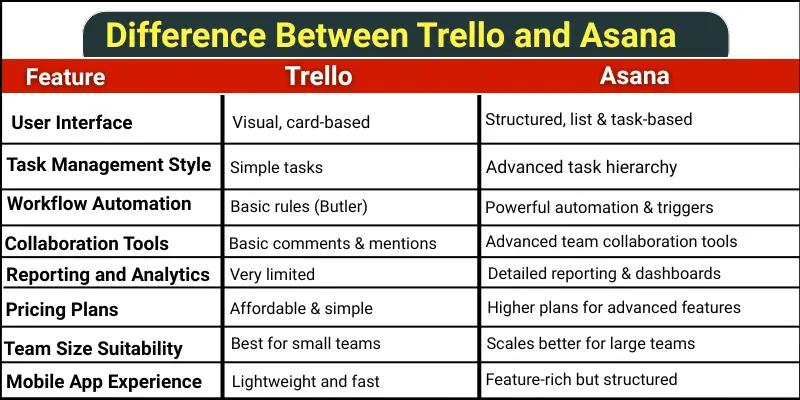
What are the difference between Trello and Asana?
Understanding the difference between Trello and Asana is important before choosing the right project management tool for your work. Both are popular, but they work in different ways.
Key Differences
- User Interface
- Task Management Style
- Workflow Automation
- Collaboration Tools
- Reporting and Analytics
- Integration Options
- Customization Level
- Pricing Plans
- Team Size Suitability
- Mobile App Experience
- File Attachment and Storage
- Best Use Case
1. User Interface
The user interface means how the tool looks when you open it and how easy it feels to use. It helps the user understand everything without getting confused.
Trello
It has a very simple and clean interface. It shows all tasks as cards placed on a board. You can drag and drop these cards easily from one stage to another. It feels just like moving sticky notes on a board, which makes it very easy for beginners.
Asana
It has a more professional and detailed interface. It shows tasks in different views like list, board, calendar, or timeline. The screen has more options and features visible at once. It gives more control but may look a little crowded for someone using it for the first time.
2. Task Management Style
Task management style means how users create, organize, and control their tasks. It shows how flexible the tool is for handling simple or detailed work.
Trello
It keeps task management very simple. Each task is a card with a title and basic details. You can add labels, due dates, and checklists inside the card. It is best for small and simple task tracking without too many options.
Asana
It offers more advanced task management. Each task can include subtasks, dependencies, deadlines, assignees, and priorities. It helps users manage complex projects in a structured way. It is better for teams that handle detailed and multi-step tasks.
3. Workflow Automation
Workflow automation means doing tasks automatically without manual effort. It saves time by performing actions based on rules set by the user.
Trello
It offers basic automation through a feature called Butler. It allows users to move cards, send alerts, or set due dates automatically. However, the automation options are simple and limited. It is helpful for light and routine tasks.
Asana
It provides more powerful automation tools. It can assign tasks, update fields, send follow-up reminders, and trigger actions across multiple projects. It helps teams save more time and avoid manual updates. It is better for managing complex workflows.
4. Collaboration Tools
Collaboration tools help team members work together easily. They allow users to share updates, ask questions, and stay connected.
Trello
Trello allows team members to comment directly on cards. They can mention others using @name and attach files or links. It is simple for basic teamwork and quick updates. However, it does not offer deep project communication features.
Asana
Asana offers more advanced collaboration features. Team members can comment, assign tasks, start discussions, and share progress updates in detail. It also shows activity history and task ownership clearly. It is better for teams that need organized and clear communication.
5. Reporting and Analytics
Reporting and analytics show how well your team and projects are performing. They help users track progress and make better decisions.
Trello
Trello has very basic reporting options. Users can see simple activity logs and board statistics. It does not give detailed charts or progress tracking. It works for small teams who need only simple updates.
Asana
Asana provides detailed reporting and analytics. Users can see dashboards, charts, workload views, and project progress. It helps teams identify delays and manage tasks effectively. It is very useful for larger projects and teams who need deep insights.
6. Integration Options
Integration options show how well a tool connects with other apps. They help users combine tools to save time and work smoothly.
Trello
Trello uses “Power-Ups” to connect with other apps. You can link Google Drive, Slack, Zoom, and more. Each board can have a few Power-Ups active at a time. It works well for basic integrations and small teams.
Asana
Asana has built-in integrations with many apps. Users can connect Gmail, Slack, Zoom, Microsoft Teams, and more. It allows multiple integrations across all projects. It is better for larger teams who need full app connectivity.
7. Customization Level
Customization level shows how much you can change a tool to fit your needs. It helps users make the workspace comfortable and organized.
Trello
Trello allows basic customization. You can change board backgrounds, add labels, and use simple Power-Ups. It is easy to adjust for small teams. However, options are limited for advanced changes.
Asana
Asana offers deeper customization. You can create custom fields, templates, and project layouts. Teams can adjust workflows to match their specific needs. It works well for complex projects and larger teams.
8. Pricing Plans
Pricing plans show how much a tool costs for different users. They help teams decide which plan fits their budget and needs.
Trello
Trello has a free plan with basic features. Users can upgrade to paid plans for more Power-Ups and automation. The paid plans are simple and affordable. It is good for small teams or beginners who need basic project management.
Asana
Asana also has a free plan for small teams. Paid plans unlock advanced features like timelines, dashboards, and more integrations. The paid versions cost more than Trello. It is better for larger teams or complex projects that need extra tools.
9. Team Size Suitability
Team size suitability shows which tool works best for small or large teams. It helps users pick the right tool for their group.
Trello
Trello works best for small teams. It is simple and easy to manage with few members. Large teams may find it hard to track many tasks at once. It is perfect for freelancers or small project groups.
Asana
Asana works well for both small and large teams. It can handle many members and complex projects easily. It provides clear task assignments and progress tracking. It is ideal for growing teams and companies.
10. Mobile App Experience
Mobile app experience shows how well a tool works on phones or tablets. It helps users manage tasks on the go.
Trello
Trello’s mobile app is simple and lightweight. Users can move cards, checklists, and labels easily. It is very similar to the desktop version. Beginners can manage their tasks quickly from any device.
Asana
Asana’s mobile app is feature-rich and detailed. Users can see tasks in different views, add subtasks, and track project progress. It works well for managing complex projects on the go. Some beginners may need a little time to get used to all the features.
11. File Attachment and Storage
File attachment and storage show how users can add and keep files in the tool. It helps teams share important documents easily.
Trello
Trello allows users to attach files to cards from their computer or cloud storage. You can add images, documents, and links. It is simple and works well for small projects. However, the storage space is limited in the free plan.
Asana
Asana also allows attaching files to tasks and projects. Users can upload documents, images, and spreadsheets. It gives more storage and better organization for larger projects. Teams can access and manage files easily within tasks.
12. Best Use Case
The best use case shows which tool works best for certain types of teams or projects. It helps users choose the right tool for their needs.
Trello
Trello is best for small teams and simple projects. It works well for visual task tracking and light workflows. Freelancers and beginners find it very easy to use. It is perfect for short-term or simple tasks.
Asana
Asana is best for larger teams and complex projects. It works well for detailed task management and long-term planning. Teams can track progress, deadlines, and dependencies easily. It is perfect for structured projects with many steps.
Conclusion
So, guys, it’s time to wrap up! We have covered the difference between Trello and Asana in detail. Personally, I recommend Trello if you have a small team or simple projects because it is easy and visual. If your team is larger or needs advanced features, Asana is the better choice. Try both tools today and see which one works best for you!
FAQs about the difference between Trello and Asana
Here are some basic questions beginners usually ask about the difference between Trello and Asana
Yes, both tools are great for personal task management. Trello helps you see tasks visually on boards. Asana lets you organize tasks in lists and easily check progress.
Yes, both are excellent for remote teams. You can communicate, share files, and track progress online. They make teamwork easier without being in the same office.
Trello lets you view and edit boards offline on mobile apps. Asana also allows limited offline access on mobile. Changes sync automatically when you go online.
Yes, both tools allow task import and export. You can move tasks and boards between apps with some setup. It is possible, but it may take a few steps to properly organize everything.

- Be Respectful
- Stay Relevant
- Stay Positive
- True Feedback
- Encourage Discussion
- Avoid Spamming
- No Fake News
- Don't Copy-Paste
- No Personal Attacks
- Be Respectful
- Stay Relevant
- Stay Positive
- True Feedback
- Encourage Discussion
- Avoid Spamming
- No Fake News
- Don't Copy-Paste
- No Personal Attacks
