Difference between SaaS and PaaS
Published: 14 Dec 2025
I recently learned that most businesses today use cloud services. While exploring them, I realized the difference between SaaS and PaaS is very important. SaaS is like ready-to-use software, and you can start using it immediately. PaaS, on the other hand, gives you a platform to build your own apps. Knowing this really made things easier for me.
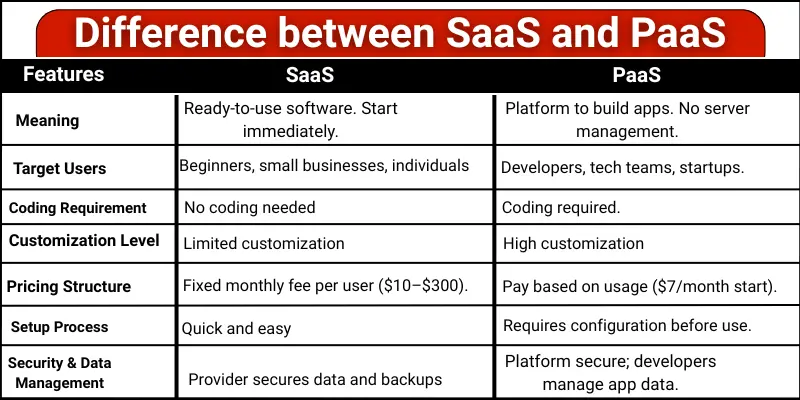
Let’s explore the complete guide to understand the comparison between SaaS and PaaS step by step!
What is the difference between SaaS and PaaS?
Cloud services can be confusing for beginners, especially when you hear terms like SaaS and PaaS. Knowing the difference between SaaS and PaaS helps you pick the right solution for your needs without wasting time or money. Here are the key features of SaaS vs. PaaS.
- Meaning
- Target Users
- Usage
- Coding Requirement
- Customization Level
- Maintenance Responsibility
- Update Handling
- Pricing Structure
- Setup Process
- Integration Method
- Scalability Management
- Best Use Case
- Security and data management
1. Meaning
SaaS and PaaS are both cloud services. Many people get confused because they sound similar. But their purpose is different. Understanding their meaning helps you choose the right service.
SaaS:
SaaS is ready-to-use software. You can start using it immediately after signing up. You do not need to create or manage anything. Common examples are Gmail, Google Docs, and Slack. If you want to know how businesses use SaaS for growth, check out this introductory guide on SaaS marketing.
PaaS:
PaaS is a platform for building applications. Developers use it to create, test, and run apps. You do not have to manage servers or infrastructure. Examples are Heroku, Google App Engine, and Azure App Service.
2. Target Users
Not every cloud service is made for the same type of user. Knowing the right audience for SaaS and PaaS helps you choose the correct option without confusion.
SaaS:
SaaS is designed for users who want simple and ready software. Office workers, students, and small businesses use it for daily tasks. Anyone can use SaaS without technical training. It works well for people who prefer ease and speed.
PaaS:
PaaS is built for people who create software. Developers and technical teams use it to develop applications. It suits users who understand programming basics. PaaS works best for teams working on software projects.
3. Usage
Usage explains how people actually use SaaS and PaaS in real life. Both serve different purposes in cloud computing.
SaaS:
SaaS is used for completing daily tasks. People use it for emails, files, meetings, and teamwork. Everything is already prepared, so users just sign in and work. It fits well into routine office and personal work.
PaaS:
PaaS is used for creating and managing applications. It helps teams work on software projects from start to finish. Developers use it to test ideas and launch apps. It supports long-term development work.
4. Coding Requirement
The coding requirement shows how much technical knowledge a user needs. This is a major difference between SaaS and PaaS.
SaaS:
SaaS does not involve coding at all. Users interact with buttons, menus, and features only. No programming or setup is needed. Anyone can use it easily.
PaaS:
PaaS involves working with code. Users write, edit, and manage applications through programming. Basic to advanced coding skills are needed. It is suitable for technical users.
5. Customization Level
Customization is important because it tells you how much you can change or adjust a service. SaaS and PaaS offer very different options.
SaaS:
SaaS has limited customization. You can change settings or themes, but the main software stays the same. It works well for most people without extra effort. You get a ready-made solution that is easy to use.
PaaS:
PaaS gives high customization. Developers can change features, tools, and even the structure of the app. It is flexible for creating unique projects. You can build exactly what you need, but it takes more work.
6. Maintenance Responsibility
Knowing who takes care of maintenance helps avoid surprises. SaaS and PaaS handle maintenance differently.
SaaS:
In SaaS, the provider manages everything. You do not need to worry about updates, bugs, or server issues. Everything works automatically, so it saves time and effort.
PaaS:
In PaaS, the provider manages the platform, but you manage your applications. Developers need to handle updates and fixes for the apps they build. This gives more control but requires some technical work.
7. Update Handling
Updates are important because they keep software safe and working well. SaaS and PaaS handle updates differently.
SaaS:
In SaaS, updates happen automatically. You do not need to do anything. The software always stays current and secure. This makes it very easy for users.
PaaS:
In PaaS, the platform updates are handled by the provider. But updates for the applications you build are your responsibility. Developers must check and apply updates themselves.
8. Pricing Structure
Price is very important when choosing a cloud service. SaaS and PaaS charge users differently.
SaaS:
SaaS is usually billed per user per month. Prices start around $10 per user per month for simple tools. Advanced business software can go up to $300 per user per month. This makes it easy to know your costs in advance. For current pricing, please visit the official Microsoft 365 website.
PaaS:
PaaS charges based on usage. You pay for computing power, storage, and other resources. Small projects can start at $7 per month, but bigger applications cost more as they need more resources. For current pricing, please visit the official website of Heroku.
9. Setup Process
The setup process tells you how quickly you can start using a cloud service. SaaS and PaaS have very different setup steps.
SaaS:
SaaS is very easy to set up. You sign up, log in, and start using the software. No installation or configuration is needed. Most users can begin immediately without any help.
PaaS:
PaaS setup takes more time. Developers need to configure the platform before building apps. You may have to set up databases, tools, and environments first. It gives flexibility but requires some technical knowledge.
10. Integration Method
Integration method tells you how easily a cloud service can connect with other tools. SaaS and PaaS handle this differently.
SaaS:
SaaS has built-in integrations. You can easily connect it to other software using plugins or apps. Most common tools, like Gmail, Slack, and Zoom, work together without extra setup.
PaaS:
PaaS uses APIs to connect with other services. Developers need to write code or use special tools to integrate apps. It is flexible but requires technical knowledge.
11. Scalability Management
Scalability tells you how easily a cloud service can grow with your needs. SaaS and PaaS handle scaling in different ways.
SaaS:
SaaS scales automatically. If more people start using the software, the provider manages the extra resources. You do not need to do anything. It is simple and stress-free for users.
PaaS:
PaaS scaling depends on developers. They can increase resources or adjust the platform when apps grow. It gives flexibility but requires technical work to manage growth.
12. Best Use Case
The best use case explains when a cloud service is the right choice. SaaS and PaaS perform best in different situations.
SaaS:
SaaS is best when quick results are needed. It works well for everyday business tasks like communication and document sharing. Users choose SaaS when they want solutions without setup or technical work. It saves time and effort.
PaaS:
PaaS is best when creating custom applications. It is helpful for building, testing, and launching new software. Teams choose PaaS when flexibility and control matter. It supports growth and innovation in development projects.
13. Security and Data Management in SaaS vs PaaS
Security and data management are very important in cloud services. SaaS and PaaS both keep data safe, but they do it in different ways.
SaaS:
In SaaS, security is mostly handled by the service provider. The provider protects data, manages backups, and applies security updates. Users just log in and use the software. This makes SaaS easy and safe for beginners and businesses.
PaaS:
In PaaS, the provider secures the platform, but developers manage their own app data. You decide how data is stored and protected inside the app. This gives more control but also more responsibility. Proper security setup is important in PaaS.
Which is Better: SaaS or PaaS?
There is no single best option for everyone. The better choice depends on your needs and skills.
- SaaS is better if you want ready-to-use software. It is easy, fast, and needs no technical knowledge. Small businesses, students, and beginners often choose SaaS because it saves time.
- PaaS is better if you want to build your own applications. It is helpful for developers and tech teams. PaaS gives more control and flexibility, but it also needs coding skills.
Conclusion
So, friends, we are almost done! In this post, we have covered the Difference between SaaS and PaaS in depth. If you want software that works right away, SaaS is a great choice. If you plan to build your own applications, PaaS is the better option. Take a moment to review your needs and choose the cloud service that best fits you.
FAQs about Saas vs Paas
Yes, SaaS and PaaS can be used together. Many businesses use SaaS tools with apps built on PaaS. This makes work easier and faster.
SaaS is usually more affordable for small users. It has fixed monthly pricing. PaaS costs depend on usage.
Yes, both SaaS and PaaS focus on data security. Providers protect the platform and systems. Users should also follow good security practices.
It depends on the startup’s needs. SaaS is great for daily business work. PaaS is better for building new applications.
First, think about your goal. Choose SaaS if you want ready software. Choose PaaS if you want to create your own apps.

- Be Respectful
- Stay Relevant
- Stay Positive
- True Feedback
- Encourage Discussion
- Avoid Spamming
- No Fake News
- Don't Copy-Paste
- No Personal Attacks
- Be Respectful
- Stay Relevant
- Stay Positive
- True Feedback
- Encourage Discussion
- Avoid Spamming
- No Fake News
- Don't Copy-Paste
- No Personal Attacks
