Google Search Console vs Google Analytics
Published: 07 Dec 2025
Confused about which tool to use for your website? Many beginners struggle to understand the comparison between Google Search Console vs Google Analytics. Google Search Console provides SEO insights and search performance data, while Google Analytics tracks user behaviour and traffic. Knowing the exact purpose of each can help you make smarter decisions for your website. If you want more helpful resources, check out my guide on the top free SEO tools.
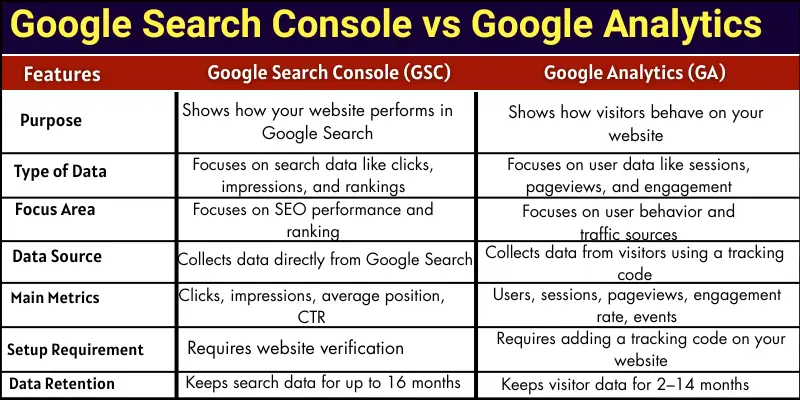
Difference between Google Search Console and Google Analytics
Google Search Console and Google Analytics are both powerful tools from Google, but they serve very different purposes. Understanding the differences between Google Search Console and Google Analytics helps website owners improve SEO and track visitor behavior effectively.
- Purpose
- Type of Data
- Focus Area
- Data Source
- Main Metrics
- Reporting Style
- Problem Detection
- Setup Requirement
- Performance Insights
- Data Retention
1: Purpose
Google Search Console and Google Analytics are two different tools. Both help you understand your website, but in various ways.
Google Search Console:
Google Search Console helps you see how your website performs in Google Search. You can check which keywords bring people to your site. It shows you how your pages appear in search results. You can also find errors that stop Google from showing your pages.
Google Analytics:
Google Analytics helps you see how visitors behave on your website. You can check how many visitors your site gets. It shows which pages they visit and how long they stay. You can also see which traffic comes from search, social media, or other sources.
2: Type of Data
Google Search Console and Google Analytics show different types of information. Both help you, but in different ways.
Google Search Console:
Google Search Console shows search data. It tells you how your website appears in Google Search. You can see clicks, impressions, and your page ranking. It focuses on data from Google Search only.
Google Analytics:
Google Analytics shows user data. It tells you how visitors act on your website. You can see how many people visit, which pages they read, and how long they stay. It focuses on real user behaviour, not just search.
3. Focus Area
Google Search Console and Google Analytics focus on different things. Each tool helps you in its own way.
Google Search Console:
Google Search Console focuses on how your website performs in Google Search. It shows which pages rank well and which need improvement. You can also check SEO issues such as indexing errors or mobile problems.
Google Analytics:
Google Analytics focuses on how people use your website. It shows which pages visitors like most and how they move through your site. You can also track traffic from search, social media, and other sources.
4. Data Source
Google Search Console and Google Analytics get their information in different ways. Each tool shows data from a special source.
Google Search Console:
Google Search Console gets information directly from Google. It looks at how people find your site in search results. It tells you which searches lead to your pages.
Google Analytics:
Google Analytics gets information from your website visitors. It tracks what people do on your site. You can see which pages they open, where they click, and how long they stay.
5. Main Metrics
Google Search Console and Google Analytics track different important numbers. Each tool focuses on its own key metrics.
Google Search Console:
Google Search Console shows SEO numbers. You can see clicks, impressions, and your average position in Google Search. It helps you know which keywords and pages perform well.
Google Analytics:
Google Analytics shows visitor numbers. You can see how many users visit your site, how many pages they open, and how long they stay. It helps you understand how people use your website.
6. Reporting Style
Google Search Console and Google Analytics display their data differently. Each tool gives reports in its own style.
Google Search Console:
Google Search Console shows SEO-focused reports. You can see your site’s search performance, indexing issues, and which pages need attention. The reports are simple and focus on Google Search results.
Google Analytics:
Google Analytics shows visitor-focused reports. You can see which pages get the most traffic and how users interact with your site. The reports include charts, graphs, and detailed numbers about user behaviour.
7. Problem Detection
Google Search Console and Google Analytics help you find problems, but in different ways. Each tool points out issues in its own area.
Google Search Console:
Google Search Console finds SEO problems. It shows broken links, pages not indexed, and mobile usability issues. You can fix these issues to help Google show your site better in search results.
Google Analytics:
Google Analytics finds user experience problems. It shows pages with high bounce rates or low engagement. You can see where visitors leave your site and improve those pages to keep users longer.
8. Setup Requirement
Google Search Console and Google Analytics require different steps to get started. Each tool has its own setup process.
Google Search Console:
Google Search Console requires you to verify your website. You prove to Google that you own the site by adding a code, HTML file, or domain verification. Once verified, you can start seeing your site’s search data.
Google Analytics:
Google Analytics requires you to add a tracking code to your website. This code collects visitor data and sends it to your Analytics account. After setup, you can watch how people use your site in real-time.
9. Performance Insights
Google Search Console and Google Analytics give different insights about your website. Each tool helps you see performance in its own way.
Google Search Console:
Google Search Console shows how well your site ranks in search results. You can check which keywords bring the most clicks. It helps you understand which pages need improvement to get more visibility on Google.
Google Analytics:
Google Analytics shows how well visitors interact with your site. You can see which pages are popular and which ones people leave quickly. It helps you understand user behaviour to make your website better.
10. Data Retention
Google Search Console and Google Analytics keep their data for different periods. Each tool stores information in its own way.
Google Search Console:
Google Search Console keeps search data for up to 16 months. You can check past clicks, impressions, and page performance. It helps you compare your website’s search growth over time.
Google Analytics:
Google Analytics keeps visitor data for 2-14 months, depending on your settings. You can look at past user behaviour and traffic trends. It helps you see long-term patterns and plan improvements.
Which Is Best: Google Search Console vs Google Analytics?
Both Google Search Console and Google Analytics are very important. They help in different ways. You cannot choose only one.
Google Search Console is best for SEO. It helps you know which pages rank well in Google. You can fix errors and improve your search performance.
Google Analytics is best for understanding visitors. It shows how people use your website. You can see which pages are popular and which ones need improvement.
The best approach is to use both tools together. Google Search Console helps your website show up in search results. Google Analytics enables you to make your visitors happy. Using both will make your website stronger and more successful.
Conclusion
So, friends, we are almost done. In this post, we have covered Google Search Console vs Google Analytics in detail. In my opinion, both tools are important for every website owner. Google Search Console helps you improve SEO, while Google Analytics helps you understand your visitors. I recommend using both together for the best results. Start using these tools today and watch your website grow!
FAQs about Google Analytics vs Google Search Console
You can use only one, but you will miss important data. GSC focuses on SEO, while GA focuses on user behaviour. Using both gives a complete picture of your website.
Yes, Google Search Console is completely free. You only need a website and a Google account to use it. It provides SEO data for all your pages.
Yes, Google Analytics is also free. It tracks visitor behaviour on your website. You can use it to improve traffic and engagement.
You need to verify your website in GSC. This can be done using a code, an HTML file, or domain verification. Once verified, GSC will start showing search data.
You need to add a Google Analytics 4 (GA4) tag to your website. This code collects visitor data and sends it to Google Analytics. After setup, you can track all user activity.

- Be Respectful
- Stay Relevant
- Stay Positive
- True Feedback
- Encourage Discussion
- Avoid Spamming
- No Fake News
- Don't Copy-Paste
- No Personal Attacks
- Be Respectful
- Stay Relevant
- Stay Positive
- True Feedback
- Encourage Discussion
- Avoid Spamming
- No Fake News
- Don't Copy-Paste
- No Personal Attacks
